
How to Write a Skills CV (2026 Guide)
A skills CV focuses on the transferable skills you have developed through your previous experiences and can be a great way to show an employer what you can bring to a role. This format works particularly well if you are new to working in higher education or have limited experience, for example, if you are early in your career, changing careers, or returning to work after a break. Tailoring your skills to match those listed in the job description is most effective, as it quickly shows the employer that you have the skills required for the role.
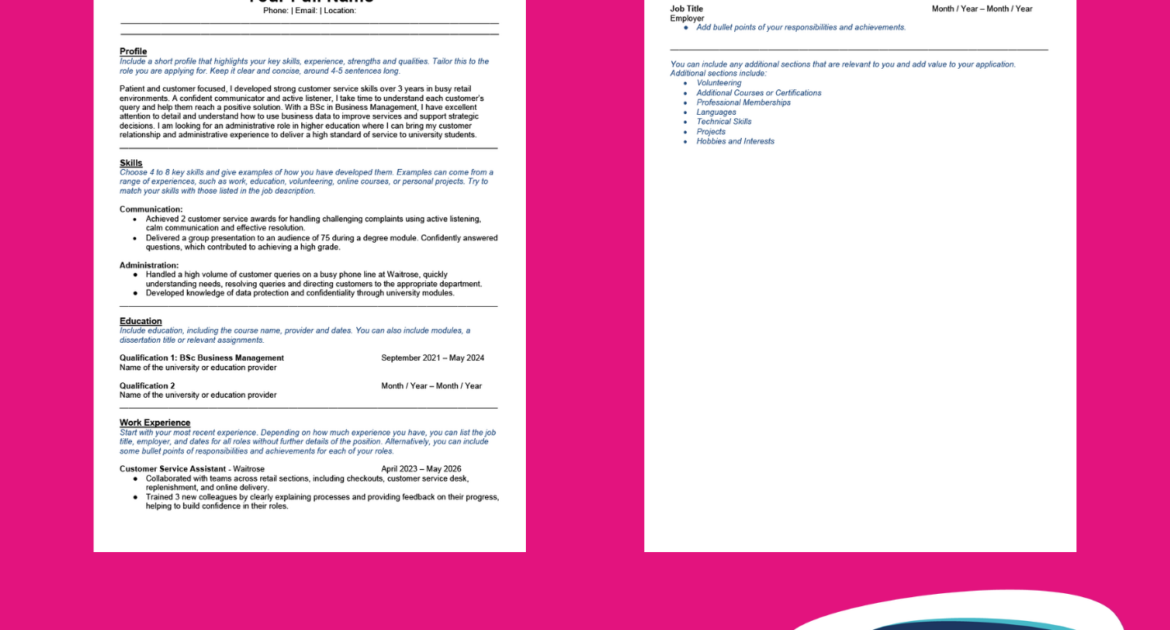
jobs.ac.uk has collaborated with Maria Barden (MB Careers) to bring you a skills CV template to help you in the 2026 job market. Maria has worked as a Careers Consultant in Higher Education and is a certified CV Writer. She is also a member of the British Association of CV Writers.
Read her skills CV guide and free downloadable template below.
Skills Employers Look For
Before writing a skills CV, go through each of your previous experiences, including work, education and volunteering, and reflect on the skills you have gained. Then look at job descriptions for the roles you are applying for to identify your transferable skills. Consider both hard skills and soft skills for a CV to highlight your technical abilities and how you work with others.
Hard skills: These are industry-specific skills gained through education, training, or experience. For example, administration, marketing or customer service.
Soft skills: These are personal traits or behaviours that show how you work with others. For example, communication, teamwork and time management.
A skills CV can be effective, especially if you have little or no experience in a similar role, as it highlights transferable skills gained through different experiences that are still relevant to the job you are applying for. Both hard and soft skills are important to employers, and a strong skills CV shows both.
How to Write a Skills CV
A classic chronological CV highlights your career progression through a detailed work experience section, whereas a skills based CV focuses on showing your value through a more detailed skills section. In a skills CV, you still include key sections such as personal details, a profile, education and work experience. However, the skills section is more detailed and clearly demonstrates your key skills with evidence. This section often works best on the first page under your profile, where it can quickly catch the hiring manager’s attention.
When writing your skills section, choose four to eight key skills from the job description. Rather than simply listing them, include examples of where you have developed these skills through your previous experiences, as employers want to see clear evidence. Where possible, include achievements. Achievements include being recognised for your work, receiving positive feedback, exceeding targets, or supporting and training others. You can include one to four examples for each skill.
Here are some CV skills examples to show how you can present your experience effectively:
Communication:
- Achieved 2 customer service awards for handling challenging complaints using active listening, calm communication and effective resolution.
- Delivered a group presentation to an audience of 75 during a degree module. Confidently answered questions, which contributed to achieving a high grade.
Similar to a classic CV, you can still include details and dates for your work experience, education, volunteering, and any other relevant sections. These sections may be less detailed than a classic CV, especially if the achievements and responsibilities from that experience have already been highlighted through your skills section.
Tips for Skills CVs
Consider Applicant Tracking Systems (ATS): Some employers use ATS software to track and manage applications. To improve your chances, tailor your CV to the role by using the keywords in the job description, highlighting any skills, qualifications, or similar job titles that you held. Your CV should be simple and clear for ATS software and the hiring manager to read.
Quantify your achievements: Use numbers such as percentages, budgets, or timeframes to show the impact of your work. For example, “Improved customer satisfaction by 15%”, “Trained 4 new colleagues”, or “Reduced waiting times by 10%”.
Use strong action verbs: Start each bullet point in your skills and work experience sections with strong action verbs such as “led”, “managed”, “oversaw”, “developed”, and “analysed”.
Focus on what makes you stand out: When choosing examples, prioritise those that are most relevant to the role. Think about what will catch the hiring manager’s attention.
Common Mistakes to Avoid
Common CV mistakes still apply to a skills CV, such as punctuation and formatting issues. Some specific mistakes for skills based CVs include:
Overlooking transferable skills: You do not need to have worked in the same role you are applying for to have transferable skills. Skills are still valid if they were gained through volunteering, personal projects or certifications. You may even have gained transferable skills in roles in another country.
Not tailoring your CV to the role: Put yourself in the recruiter’s shoes. If your CV is too generic and fails to highlight the skills the recruiter is looking for, they may not see your value. Take the time to tailor your CV for each role.
Poor organisation: A skills CV often includes more detail than a chronological CV, as you are providing examples of your skills. Avoid large paragraphs and use bullet points to make your examples clear and easy to read.
Too long: A skills CV includes a detailed skills section, but it should still follow standard expectations of 1 to 2 pages. Other sections may need to be more concise.
Free Skills CV Template
Our free skills CV template can be used as a starting point to help you highlight your key skills for roles in higher education. Remember to tailor each application to the role you are applying for, as this will give you the best chance of showing the employer that you are a great fit.
Download PDF Template
Download Word Template
Download Docs Template


Leave a Reply