
Want to know how to write a strong, tailored CV?
In this article, Career Coach Cathy Balfe breaks down everything you need to know about writing a CV that gets noticed in the UK jobs market in 2026. Cathy is a Career Guidance Professional with over a decade of experience supporting clients’ career development and is a member of the Career Development Institute. Please find an editable, ATS compliant Free CV template below to download.
How to write a CV – a Step-by-Step guide
Download Free CV Template
Step 1: Summarise the job requirements
Summarise the list of skills, experience and education required for the role. The job description usually lists them explicitly, but it is also worth reading the role description for further insight into the skills and knowledge required for the role. You now have a blueprint of what the employer is looking for – extremely useful in tailoring your CV.
Step 2: Reflect on your relevant experience
When have you demonstrated the skills required? Ideally this will be from a recent job, but you can also use education and extracurricular experiences to demonstrate skills.
Step 3: Choose ATS compliant CV
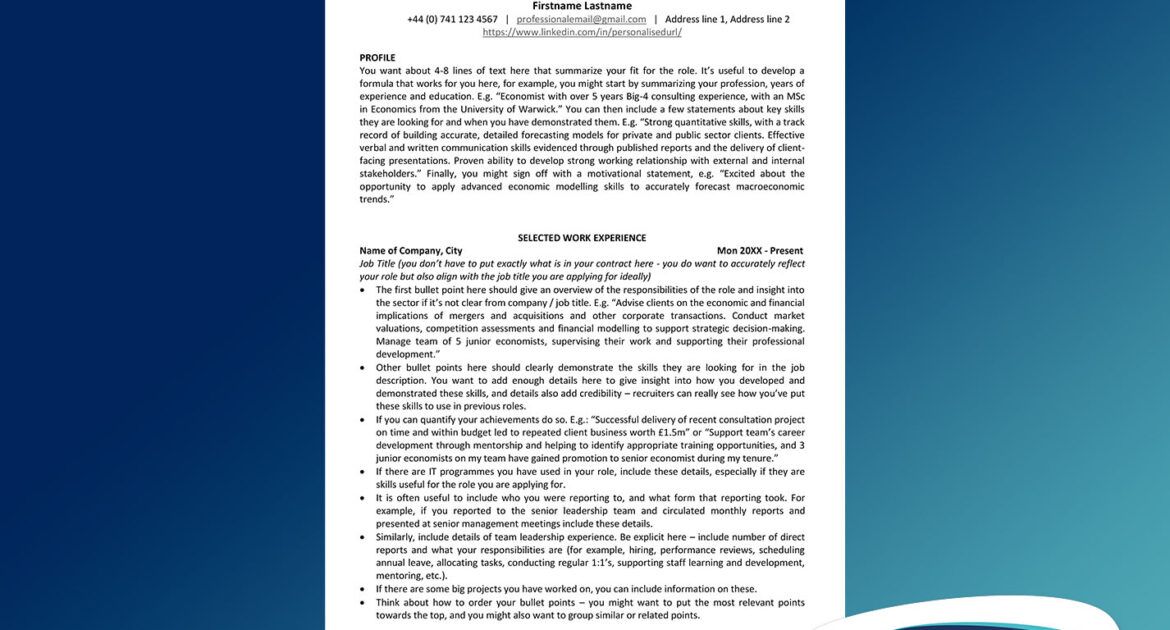
Choose a CV template that is ATS (applicant tracking system) compliant – more on this later. We have provided a free CV template that you can download in word, google doc or pdf format. This jobs.ac.uk CV template is easy to scan read – with dates, employer name and job title clearly visible.
Step 4: Get typing!
Decide what are the most relevant parts of your career history – these experiences should take up space on your CV, and start typing up your CV.
Step 5: Tailor your profile section
Tailor the profile section to the role – I often do this section last. I suggest 4-5 sentences that summarise your fit. Typically, this includes – work experience, relevant sectors or industries you have experience in, relevant education and evidence of 2-3 key skills required for the role. You can also include motivation for the role.
Step 6: Review your CV
If your CV is over 2 pages cut it back to fit on 2 pages. You can adjust margins, font type or size and line spacing, but you might also need to take out less relevant information at this stage. Avoid the urge to shrink your font size to illegible proportions.
Step 7: Proofread
Proofread your CV – check for typos or errors. If possible, get a second pair of eyes to help here – it can be hard to find your own mistakes.
Step 8: Save a copy of your CV
Save your CV with a professional name, like “CV_Cathy_Balfe.docx” before submitting and save a copy for reference later. It is useful to refer to the application materials you submitted if called to interview.
What to put in your CV?
The key sections to include are contact details, profile, work experience and education. There is some flexibility then on additional sections. Some people will include skills, additional training / CPD, extracurricular activities / voluntary work and a hobbies / interests sections.
What contact details to include?
- Start your CV off with your name (no need to write “Curriculum Vitae” – it is obvious to employers what the document is).
- Include a phone number – if you are applying to a multinational company you might want to include the country code (e.g. +44 (0) 741 123 4567).
- Include a professional email address – avoid year of birth or nicknames appearing on this. Don’t use your current company email address unless applying for an internal position.
- Include your LinkedIn link if you wish – if so, make sure your profile aligns with your CV. You can shorten your LinkedIn URL to avoid the trailing random numbers / letters by following the instructions here. Make sure the link is working as expected.
- Include either full postal address or City & Country.
How to write a profile section for my CV?
- It is helpful to have a formula you use for structuring your profile. For example, your first sentence might summarize profession, experience and qualifications. E.g. “Economist with over 5 years Big-4 consulting experience, with an MSc in Economics from the University of Warwick.”
- Next, pull out a few key skills and briefly evidence when you have demonstrated them in the past. E.g.: Strong quantitative skills, with a track record of building accurate, detailed forecasting models for private and public sector clients. Effective verbal and written communication skills evidenced through published reports and the delivery of client-facing presentations. Proven ability to develop strong working relationship with external and internal stakeholders.”
- Consider including a motivational statement at the end. E.g.: “Excited about the opportunity to apply advanced economic modelling skills to accurately forecast macroeconomic trends.”
What should I include in the work experience section?
- With the work experience section, aim for the first bullet point to give a high-level summary of the role and main responsibilities.
- Subsequent bullet points should focus on detailed descriptions of job duties – make sure you are demonstrating the skills required for the role. Add enough details to give both insight and credibility – quantifying achievements or results can help here.
- Incorporate the employer’s language – include their key words in your CV where appropriate.
How detailed should my education section be?
- Make sure key details like name of university / school, name of qualification, level of qualification and qualification year are clear.
- If your education is the most relevant entry on your CV for the role you are applying for, go into details that give this section more weight on your CV. For example, you can include details of relevant modules you have studies, or technical or research projects you were involved in.
- Similarly, if there are technical skills like lab skills or IT skills developed through you studies relevant for the role, make sure to cover these (especially if you haven’t demonstrated them elsewhere on your CV).
- If you have enough relevant work experience you might want to keep this short and include only key details like name & location of University / School, years of attendance, name and level of course.
- If you graduated with a good grade, you could highlight this by including the grade.
- There might be other aspects worth highlighting – for example, if you were elected class representative and need to demonstrate leadership / communication skills, or if you were involved in relevant clubs / societies.
How can I include continuous professional development / training?
- You can include additional training / CPD as a separate section. Sometimes people have an extensive list of CPD qualifications – you might want to have a section called “Recent CPD” to flag that you only included a subset of courses you have completed.
- I recommend including key details like name of course, provider & location and year completed. If the training course is recognised by Ofqual, you could include the level and number of credits associated with the course.
- You can include self-directed learning here that you might have completed, for example, through online learning platforms like Coursera.
Should I include a skills section?
- If you are including a skills section, I recommend you keep it to technical skills (such as IT skills, laboratory skills and languages).
- Rather than listing transferrable skills here, in my opinion it is better to demonstrate where in your experience or education you have demonstrated these.
Is it worth including hobbies / interests on my CV?
This depends. It’s worth including a hobbies / interest section if:
- You have the space on your CV.
- You have hobbies that lend themselves to ice-breaker conversations at interview.
- You have hobbies / interests that demonstrate attributes / skills the employer is looking for. For example, if you have competed at sports to a high level – this demonstrates commitment, perseverance and if it is a team sport, teamwork and communication. Or if you have acted as Treasurer for your local school – this demonstrates financial management, numerical skills, integrity, collaboration and time management if combined with other work or caring responsibilities.
Should I include references on my CV?
- I recommend ending your CV with “References available upon request”. It signals to the recruiter that they have reached the end of your CV.
- Choosing not to include your references’ personal contact details demonstrates your regard for privacy and a working knowledge of GDPR.
Skills Employers Look For
LinkedIn analyses skills in demand by employers each year. In their “LinkedIn Skills on the Rise 2026” article they highlight trends in the UK skills market. For 2026, the 5 fastest growing skills they list include:
- AI, Machine Learning and Generative Technologies
- Data Strategy & Workflow Optimisation
- Operations & Risk Resilience
- Leadership, Culture & Communication
- Commercial, Intelligence & Delivery
They also analysis the fastest growing skills across 10 industry sectors.
However, when it comes to writing a tailored CV for a particular job, I would go back to Step 1 in the “How to Write your CV” section above – and develop a blueprint of the skills the employer is looking for. This is what you need to focus on demonstrating throughout your CV.
Common mistakes to avoid
Here are 10 mistakes I see time and time again in clients’ CVs:
1: Not including enough detail in your CV
Make sure you have enough detail in your work / education sections to demonstrate you have the skills they are looking for.
2: Copying and pasting your old job description into your work experience.
This is really boring to read and doesn’t give enough details. Details give credibility and insight into how you demonstrated the required skills.
3: Using generative AI to write your CV.
This can often result in content that is generic and doesn’t give enough details. Generative AI like ChatGPT can be helpful in rephrasing but it can’t read your mind – you need to add the details.
4: Going over 2 pages
Unless you are applying for academic jobs or medical jobs your CV should not be longer than 2 pages. Any longer than this and recruiters will zone out. You also want to avoid 1.5 pages, as it indicates to recruiters you have nothing else to add. If you have very little work experience it is fine to keep it to 1 page.
5: Including hobbies that give no insight.
For example, if you say you like going to the cinema, reading or going for walks – so do most of the population. You’ve put the recruiter to sleep, have shown a lack of awareness and taken up valuable space on your CV where you could have been demonstrating relevant skills.
6: Including personal information
Don’t include details like date of birth, personal photograph, marital status – these are not expected on UK CVs and can detract from the professional impression you want to make.
7: Broken links
I often find LinkedIn URLs on clients’ CVs are incorrect – test this on your own CV if you are including one. Usually, people get their phone number and email address correct, but double check this!
8: Important information in the header / footer
Sometimes, people put their contact details & name into the header section on Word – avoid this – if people are opening your CV using different word processing software this might not be visible. This information might also get lost in translation in ATS software.
9: Not including ongoing education
If you are currently studying towards a qualification, include this on your CV, especially if it is relevant for the role you are applying for. For dates, you can have “2025 – present” for example to note that you have not yet completed this qualification.
10: Font size being too small
Don’t shrink text to miniscule proportions to make your CV fit on 2 pages. It’s better to make the decision to cut down on less relevant information on your CV.
ATS Tips for CVs
What is ATS?
ATS stands for Application Tracking System. Many employers use ATS software to help manage the high volume of applications they receive. There are many different ATS providers out there, but most will read your CV into a database, with variables extracted including name, email address, phone number, location, LinkedIn, job titles, employer names, etc.
ATS Tips:
- Use a CV template that avoids heavy formatting.
- Avoid using tables or multiple columns.
- Avoid using icons, logos or other graphical elements like lines or boxes.
- Use easily understandable sections, such as “Work Experience”, “Education”, “Skills”.
- Don’t put anything into the header or footer.
- Use keywords reflecting the language used in the job description. Some ATS will calculate keyword match between your CV and the job description and rank your application based on this. Also, recruiters might search the database using keywords to find qualified applicants. You should use both long and short versions of keywords where appropriate (e.g. SEO and Search Engine Optimisation).
- Upload your CV as a word / pdf document (check when uploading what formats are accepted).
📥 Download the free CV template in other formats:
Free CV Template (Word)
Free CV Template (PDF)



very interesting and useful
Dear Sir,
Good Evening.
CV drafting guidance by Cathy Balfe is an excellence piece of well drafted navigation tool for CV writing, thanks to her.
Even after being associated in Industry and Academics for about 30 years and extensive traveler, I found the article very informative and helpful.
After my superannuation I want to be associated for the public good organization to utilize my experience and exposure for human development and societal god.
With profound regards
Dr. Firdous Wani